Physical Address
Metro Manila, Philippines
Physical Address
Metro Manila, Philippines

Running your own mail server means that when something goes wrong, you sometimes need to investigate far beyond whether Postfix, LDAP, or the mailbox service is running.
In this case, we were troubleshooting a production Zimbra Collaboration server running on Ubuntu when we discovered processes and files that clearly did not belong to the normal Zimbra installation.
The investigation eventually uncovered suspicious executables, files placed in unusual directories, repeated execution under the zimbra account, an unauthorized cron entry, and signs that the account itself required further investigation.
This article documents what we actually found and the troubleshooting steps we performed.
Customer names, domains, IP addresses, SSH keys, credentials, and other identifying information have been removed or replaced with placeholders.
Important: This is a case study, not a universal malware-removal procedure. A compromised production server should be treated as untrusted. Preserve evidence before deleting files or making major changes.
The server was already undergoing troubleshooting when we encountered processes that did not appear to be part of Zimbra.
Two names immediately stood out:
javab
idle
A process name by itself does not prove that something is malicious. Linux applications can use almost any executable name.
The problem was the combination of several observations.
The processes were running under the zimbra account. Related files appeared in locations where we would not expect normal Zimbra binaries. Additional hidden files were present. Some of the processes returned after they were terminated.
We therefore treated the server as potentially compromised and started investigating the operating system instead of looking only at Zimbra service status.
One of the first tasks was determining whether the processes were currently running.
Commands such as ps and pgrep are useful for this.
For example:
ps aux | grep -E 'javab|idle'We also used process searches similar to:
pgrep -a javab
pgrep -a idle
The -a option tells pgrep to display the complete command line together with the process ID. The Linux pgrep documentation confirms that pgrep searches running processes and that -a displays the full command line.
One suspicious process showed a command resembling:
./javab -o <REMOTE_HOST>:<REMOTE_PORT>The actual destination has been removed.
At this point, we had enough evidence to consider the process unauthorized. However, we did not rely solely on the process name.
An important rule when investigating Linux systems is to examine what the process is actually executing.
For a known PID, Linux exposes useful information through /proc.
For example:
readlink -f /proc/<PID>/exeThis can identify the executable associated with a running process.
You can also examine its command line:
tr '\0' ' ' < /proc/<PID>/cmdline
echo
Linux documents /proc/<PID>/exe as a symbolic link to the pathname of the executed program. /proc/<PID>/cmdline contains the process command-line arguments, although processes can alter what appears there, so it should be considered one source of evidence rather than absolute proof.
These /proc checks are useful additional investigation steps. Our initial investigation relied mainly on the process list, filenames, filesystem searches, and logs.
/dev/shmThe next major finding was a collection of suspicious files associated with the processes.
Some appeared under:
/dev/shm/Files included names such as:
idle
javab
.khp
.khp_ts
.rguard
The leading dot on files such as .khp and .rguard makes them hidden from a normal ls command unless -a is used.
For example:
ls -la /dev/shm/dev/shm itself is legitimate. Linux normally uses it as a tmpfs-backed filesystem for POSIX shared memory. Finding files there therefore does not automatically indicate an intrusion.
What made these files suspicious was their relationship to the unauthorized processes and the fact that they did not belong to the expected Zimbra installation.
Attackers and unauthorized software may also use temporary or memory-backed locations because they are writable and may attract less attention from administrators. However, the location alone is never enough to classify a file as malicious.
One thing we did correctly during the investigation was preserve copies of suspicious artifacts.
Evidence from /dev/shm was copied into an incident directory similar to:
/root/zimbra-incident-YYYYMMDD/That allowed us to continue investigating the server without immediately losing the original files.
For a future incident, I would go further and record cryptographic hashes before modifying anything:
sha256sum /path/to/suspicious/fileI would also collect metadata:
stat /path/to/suspicious/fileand identify the file type:
file /path/to/suspicious/fileThose are additional recommendations. They were not the primary commands that led us to discover the compromise.
Deleting suspicious files immediately can destroy useful information about timestamps, ownership, permissions, hashes, and relationships between different components.
After discovering the filenames, we searched several likely locations for additional copies.
One of the searches we performed was similar to:
find \
  /home /root /tmp /var/tmp /dev/shm /run /opt/zimbra \
  -xdev \
  \( \
    -name 'javab' -o \
    -name 'idle' -o \
    -name '.khp' -o \
    -name '.khp_ts' -o \
    -name '.rguard' -o \
    -name 'ksmd' \
  \) \
  -ls 2>/dev/null
This search was intentionally targeted.
The directories covered several areas relevant to the incident:
/home
/root
/tmp
/var/tmp
/dev/shm
/run
/opt/zimbra
The -xdev option keeps the search on the same filesystem for each starting point, which can help prevent a search from unexpectedly crossing into other mounted filesystems.
We were searching for known indicators discovered during the investigation rather than searching every file for anything that looked strange.
That distinction matters. Once you identify indicators such as filenames, paths, process names, hashes, remote destinations, or accounts, they can be used to narrow the search.
/home/SSL DirectoryAnother important location was:
/home/SSL/This directory contained additional suspicious components.
At different stages of the investigation, we encountered files including:
.khp
.khp_ts
.app_args
.java_cache
javab
idle
The directory name SSL could easily appear legitimate during a quick inspection. That is why directory names should not be trusted simply because they sound related to certificates, security, Java, or another legitimate service.
You need to inspect ownership, permissions, timestamps, contents, running processes, and references to those files.
For example:
ls -la /home/SSLand:
stat /home/SSL/.khpcan reveal information about ownership and timestamps.
Once we confirmed that the processes were unauthorized, we terminated them.
We used process-management commands such as:
pkill javab
pkill idle
or, when working with a specific PID:
kill <PID>pkill sends a signal to processes matching its selection criteria. By default it sends SIGTERM.
This is an important point in incident response.
Killing a suspicious process is containment, not necessarily remediation.
A process can return if something else is responsible for launching it.
That is exactly what happened in this case.
/home/SSLAs part of containment, we also removed executable permission from files in the suspicious directory:
chmod -R a-x /home/SSLThe command removes execute permission for all users from files and directories under /home/SSL.
GNU chmod changes the mode bits associated with files and directories.
Do not copy this command and run it against an arbitrary directory.
Recursive permission changes can break applications and can also alter evidence. In our case, /home/SSL had already been identified as part of the suspicious activity and the command was used as a containment measure.
In a more formal forensic investigation, I would first isolate the host and capture the evidence before changing permissions.
This was the turning point.
After terminating the suspicious processes, we later discovered that unauthorized activity had returned.
That told us something important.
We were not dealing with only a running process.
Something on the system was starting it again.
At this point, the question changed from:
What is this process?
to:
What keeps starting this process?
That led us to investigate persistence mechanisms.
Because the suspicious processes were associated with the zimbra account, its scheduled jobs became an obvious place to inspect.
Zimbra legitimately uses cron jobs, so administrators should not simply remove the entire zimbra crontab.
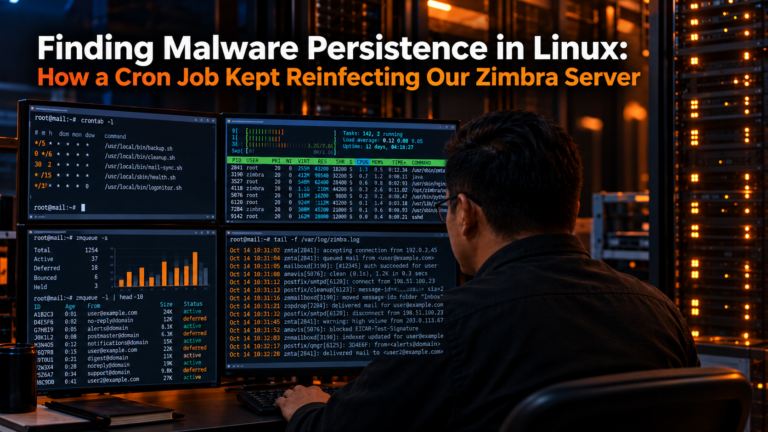
We inspected it and discovered an entry that did not belong there:
* * * * * /home/SSL/.khpThis was a major finding.
A cron entry contains five scheduling fields followed by the command. With an asterisk in all five scheduling positions, the command is scheduled every minute. Linux’s crontab(5) documentation describes the five fields and the use of * for all valid values.
In other words:
* * * * * /home/SSL/.khpwas repeatedly executing:
/home/SSL/.khpThis explained why killing the visible processes did not solve the problem.
Zimbra normally maintains scheduled tasks for its own operations.
Zimbra’s documentation shows that its standard cron configuration contains recognizable Zimbra-managed sections and even documents procedures for rebuilding the zimbra user’s crontab from files under /opt/zimbra/conf/crontabs/ on supported generations of Zimbra.
Our suspicious line did not represent a normal Zimbra maintenance task.
More importantly, Zimbra’s own security investigation guidance specifically recommends checking the zimbra crontab for unauthorized modifications when investigating a compromised system. The Zimbra security document even provides an example of a malicious one-minute cron entry used to download and execute a script.
That closely matched the type of persistence we were seeing.
Finding the cron entry gave us a hypothesis.
The next step was checking whether the system logs confirmed its execution.
On this Ubuntu server, cron activity was recorded in /var/log/syslog.
We searched for relevant entries:
grep -hE 'CRON.*zimbra' \
  /var/log/syslog \
  /var/log/syslog.1 \
  2>/dev/null
The logs contained records similar to:
CRON[<PID>]: (zimbra) CMD (/home/SSL/.khp)This was important because we now had three pieces of evidence pointing to the same chain:
zimbra crontab
      |
      v
/home/SSL/.khp
      |
      v
suspicious processes
The cron configuration showed what should execute.
The system log showed that cron actually executed it.
The process list showed the resulting suspicious activity.
Ubuntu documents /var/log/syslog as a general system log and /var/log/auth.log as a log containing authorization activity, including remote logins. On systems relying primarily on the systemd journal, journalctl can also be used to query system and service records.
Once we had a suspected execution period, we narrowed the logs to specific times.
For example:
grep -hE \
  'Sep  2 09:(3[0-9]|4[0-9]|5[0-9]).*(CRON|CMD)' \
  /var/log/syslog \
  /var/log/syslog.1 \
  2>/dev/null
Searching a smaller time window is useful because large production logs can contain thousands or millions of unrelated events.
Instead of reading an entire log sequentially, we correlated:
process activity
file timestamps
cron execution
authentication events
system events
This helped us build an incident timeline.
The cron entry was the persistence mechanism we confirmed during this part of the incident.
That does not mean cron is the only persistence mechanism an attacker can use.
After finding unauthorized persistence, I recommend checking other mechanisms such as systemd services and timers, shell startup files, SSH keys, legacy init scripts, application startup scripts, and additional user crontabs.
For example:
systemctl list-timers --alland:
systemctl list-unit-files --type=servicecan help identify scheduled or automatically started systemd components.
These are additional investigation steps. They should not be interpreted as additional persistence mechanisms that we confirmed on this server.
The investigation later expanded to SSH access associated with the zimbra account.
We inspected:
/opt/zimbra/.ssh/authorized_keysand found entries that required investigation, including a key with a forced command and additional SSH keys.
We then reviewed:
/var/log/auth.logfor successful public-key authentication events.
The logs showed an accepted public-key login for the zimbra account from an internal IP address during the incident period.
This was significant, but it did not prove that SSH was the original attack vector.
That distinction matters.
An authentication record can prove that authentication occurred. It does not automatically prove who controlled the key, whether that access created the original compromise, or whether the key itself had been installed earlier through another attack path.
We therefore treated the SSH evidence as another part of the incident rather than declaring it the initial cause.
A separate PinoyLinux article will cover that SSH investigation in detail.
Even during an operating-system investigation, it is useful to understand the state of Zimbra.
Zimbra provides:
su - zimbra
zmcontrol status
to display the state of its services.
Current Zimbra documentation lists zmcontrol status as the command for displaying the status of Zimbra components.
This can help differentiate between a security problem and a normal service failure.
However, a healthy:
mailbox   Running
mta       Running
ldap      Running
does not mean the operating system is clean.
A compromised server can continue delivering mail normally.
That was one of the most important lessons from this investigation.
Incident reports become unreliable when assumptions are presented as facts.
From the evidence described here, we established that unauthorized files and processes existed, that they operated under the zimbra account, and that an unauthorized cron job repeatedly executed /home/SSL/.khp.
We also discovered SSH activity and suspicious SSH configuration that required investigation.
What we did not conclusively establish during this phase was the original attack vector or the identity of the attacker.
We therefore should not state that:
SSH definitely caused the compromise.or:
A specific Zimbra vulnerability definitely caused the compromise.unless additional evidence proves those claims.
The correct conclusion is that the server was compromised and that multiple indicators required further investigation.
Suppose we had performed only:
rm -rf /home/SSL
pkill javab
pkill idle
and stopped there.
The server might have appeared clean temporarily.
We would have lost important evidence, and we might never have understood how the processes kept returning.
The cron investigation changed the situation because it identified a repeatable persistence mechanism.
That is why incident troubleshooting should focus on relationships between artifacts rather than individual filenames.
In our case, those relationships looked roughly like this:
Zimbra account
     |
     +---- suspicious cron entry
     |           |
     |           v
     |    /home/SSL/.khp
     |           |
     |           v
     |     suspicious processes
     |
     +---- suspicious SSH configuration
     |
     +---- authentication records
Each item alone tells only part of the story.
Together, they established that this was more than a failed Zimbra service or an isolated process.
We killed processes and restricted execution of suspicious files because we needed to contain the active activity.
But after discovering persistence and questionable account access, we could no longer assume that removing the visible artifacts restored the integrity of the system.
Once an attacker may have obtained sufficient access to modify scheduled tasks, install executables, alter SSH configuration, or operate under an application account, there may be modifications that have not yet been discovered.
For a critical production system, the safer long-term approach is normally to preserve required evidence and business data, rotate affected credentials and keys, build a clean replacement system, patch it fully, restore only trusted data, and verify the environment before returning it to production.
Cleaning the visible files can be useful for containment. It should not automatically be treated as proof that the server is trustworthy again.
The following summarizes some of the commands directly related to what we performed:
# Look for suspicious processes
ps aux | grep -E 'javab|idle'

pgrep -a javab
pgrep -a idle


# Inspect suspicious directories
ls -la /dev/shm
ls -la /home/SSL


# Search for known suspicious filenames
find \
  /home /root /tmp /var/tmp /dev/shm /run /opt/zimbra \
  -xdev \
  \( \
    -name 'javab' -o \
    -name 'idle' -o \
    -name '.khp' -o \
    -name '.khp_ts' -o \
    -name '.rguard' -o \
    -name 'ksmd' \
  \) \
  -ls 2>/dev/null


# Stop confirmed unauthorized processes
pkill javab
pkill idle


# Containment used on the identified suspicious directory
chmod -R a-x /home/SSL


# Review the Zimbra user's scheduled jobs
crontab -u zimbra -l


# Search cron execution records
grep -hE 'CRON.*zimbra' \
  /var/log/syslog \
  /var/log/syslog.1 \
  2>/dev/null


# Check Zimbra service state
su - zimbra
zmcontrol status
Do not treat this block as a malware-cleanup script.
The commands were used during an investigation in response to evidence we had already collected. Commands that terminate processes or change permissions should only be used after you understand what they affect.
If I handled the same incident again, I would collect more evidence before containment:
# Record hashes
sha256sum /path/to/suspicious/file

# Record metadata
stat /path/to/suspicious/file

# Identify file format
file /path/to/suspicious/file

# Check the executable behind a running process
readlink -f /proc/<PID>/exe

# Inspect its command line
tr '\0' ' ' < /proc/<PID>/cmdline
echo

# Inspect open files and connections if lsof is installed
lsof -p <PID>

# Review systemd timers
systemctl list-timers --all

# Review authentication activity
grep -E 'Accepted|Failed|Invalid user' /var/log/auth.log
I would also capture network connections and process information before terminating anything.
This improves the incident timeline and increases the chance of identifying how individual artifacts are connected.
The main lessons from this incident were:
* * * * * /home/SSL/.khp.SSL and an executable called javab can look plausible at first glance.This incident started with a few strange process names.
It eventually led us through running processes, hidden files, /dev/shm, /home/SSL, Zimbra’s crontab, syslog records, SSH access, and additional system-level investigation.
The most important discovery was not javab, idle, or even .khp by themselves.
It was understanding how they were connected.
The cron entry:
* * * * * /home/SSL/.khpexplained why the suspicious activity could return after the visible processes had been killed.
For Linux administrators, that is the key lesson. When you find an unauthorized process, do not stop your investigation at the process.
Find out who started it, what file it came from, what keeps launching it, what account owns it, when it first appeared, what it communicated with, and what other changes occurred around the same time.
That is how a strange process becomes an incident you can actually understand.
Zimbra: Investigating and Securing Systems
Zimbra’s security investigation guidance covers compromised-system investigation, rogue accounts, suspicious cron entries, and related checks.
Zimbra: Rebuilding the Zimbra User Crontab
Documents the standard Zimbra crontab structure and Zimbra-managed cron configuration.
Zimbra: zmcontrol
Official command reference for checking and controlling Zimbra services.
Linux crontab(5)
Documents cron file syntax, scheduling fields, and scheduled command execution.
Linux pgrep(1)
Documents pgrep, pkill, process selection, and full command-line output.
Linux proc_pid_cmdline(5) and proc_pid_exe(5)
Documents Linux process command-line and executable information under /proc.
Linux tmpfs(5) and shm_overview(7)
Documents /dev/shm and its use for POSIX shared memory.
Ubuntu: Viewing and Monitoring Log Files
Documents /var/log/syslog, /var/log/auth.log, and other standard Ubuntu logs.